
WriteLog versions 12.93 and beyond support the piper1-tts text-to-speech engine from here: https://github.com/OHF-Voice/piper1-gpl.
What is text-to-speech and how does WriteLog use it?
Text to speech, TTS, is a technology that accepts text input and produces spoken audio in response. In a primitive sense, WriteLog has long supported TTS with its ability to put text into an f-key message by scanning for .WAV files in the “TX Wave File Location…” directory in its Setup/WriteLog-options/Sound dialog.
Piper-TTS does not use prerecorded wave files, but instead requires a speech “model” file and a software engine that takes the model input and the text to be spoken then generates audio.
Where would I get a voice model?
There are publicly released voice models for piper published at https://huggingface.co/rhasspy/piper-voices/tree/main. It is also possible to create a model from your own voice. Creating a model requires two time consuming steps, plus an export step to create the model file. The model file will be on the order of 100MB in size. Piper1-gpl requires the model in two separate files to be supplied to the engine. That is why you see a pair of files for each downloadable voice. The main model generally has extension .onnx, and the much smaller, text descriptive file has extension .onnx.json. The steps required to train a model with your own voice are:
- A (long) recording session where you read dozens or even hundreds of phrases into your microphone. The recording studio is published here:
https://github.com/rhasspy/piper-recording-studio
W5XD published a more ham contesting specific recording script here: https://github.com/w5xd/PiperRecordingHelper. - A compute-intensive “training” program step that takes the text of the phrases you read and the WAV file recordings done through your microphone, and creates a model. The training software is in the same github repository as the piper engine: https://github.com/OHF-Voice/piper1-gpl.
Well, piper itself is in transition. As of this date, early January, 2026, you probably should train a model
using the older piper at https://github.com/rhasspy/piper/blob/master/TRAINING.md. - The export step takes the training results and creates the .onnx and .onnx.json files.
Before setting out to create a model of your own voice, consider the fact that once someone has a copy of your model, they can simulate your voice saying anything they type to it.
The piper-recording-studio is a web application that records from the microphone at your internet browser. You probably want to use your station mic for recording so that your voice model matches your radio voice. As of this writing, all the model creation software for the three steps is supported only on Linux and not Windows, and the training item pretty much requires a modern GPU else is reported to take days to complete.
The three steps above are not specific to WriteLog, nor is your choice of whether to download a public voice model.
WriteLog setup
WriteLog version 12.93 and forward is capable of using only a particular flavor of HTTP. We have written such a server.
The WriteLog-specific piper server
That WriteLog-specific formatting and performance is provided with this: https://github.com/w5xd/piper_http_server. The server is built on top of piper1-gpl and is not installed as part of the WriteLog product install. You download and install the http server separately. Even though W5XD at WriteLog Contesting Software LLC is is the original author for both WriteLog itself and this the WriteLog interfacing part of this http server, the two are distributed separately because each has a very different licensing requirement and software installation dependencies.
The w5xd piper server was written to support WriteLog’s own performance requirements, but the piper server is an open source GPL licensed product, which means other products can use it if they choose to.
Setup WriteLog to use the piper server
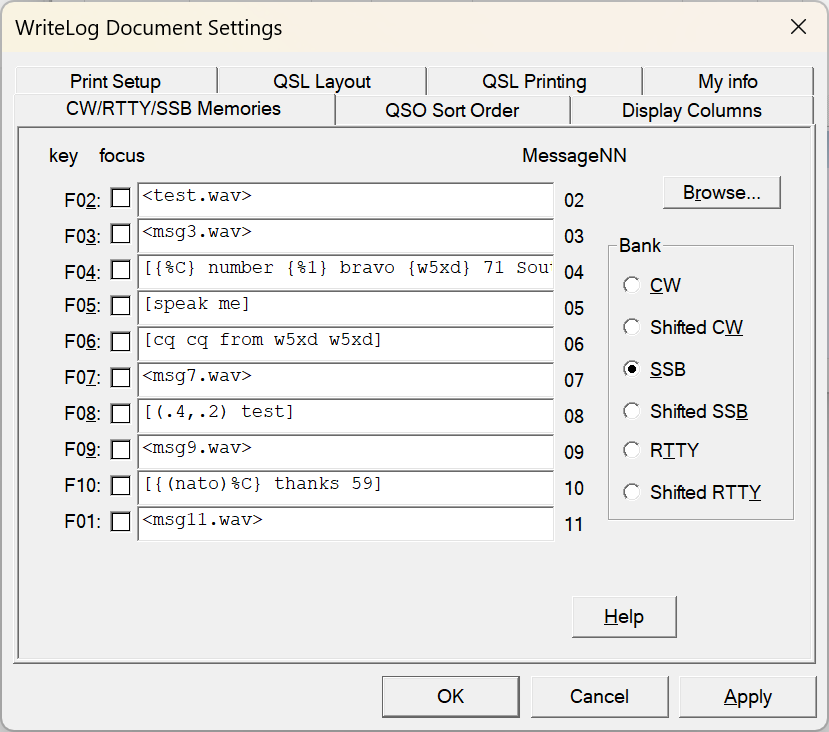
In WriteLog, you tell WriteLog to use the TTS engine on its usual Setup/Document/CW-RTTY-SSB-messages. Surround the text you want spoken with square brackets: [ and ]. WriteLog sends all the text between the square brackets to the TTS engine. Or at least it tries to. If you don’t have the http server installed and running, then it still tries, but you’ll only get an error box.
The F04 message above is repeated here:
[{%C}, number {%1} bravo, {w5xd} 71 South Texas]
The entire message is contained in square brackets, which means WriteLog sends the whole message to the TTS engine. The %C is itself enclosed in curly braces {%C}. The curly braces tell WriteLog not to send the CALL to the TTS engine directly, but instead create a phrase of the phonetics of the letters. For example, if W1AW is in your CALL field, and you have {%C} then WriteLog will send “whiskey one alpha whiskey” to the TTS engine instead of “W1AW”. The {W5XD} in the example tells WriteLog to send “whiskey five xray delta” to the TTS engine. Finally, note that the {%1} is also in curly braces. If your transmitted serial number is 11, for example, the curly braces tell WriteLog to transmit the phrase “one one”. Without the braces, it will send “11” to the TTS, which will say the word “eleven.”
It is possible to mix and match TTS with traditional WAV files even in the same message, but WriteLog requires matching sample rates for the WAV file recordings as for the TTS engine. Set MicSampleRate in writelog.ini to match the sample rate in your piper model. The piper models are categorized as large, medium and small, which are at rates 22050, 22050, and 16000, respectively. Here is an example of a mixed message:
[{%C} number {%1}] <MSG3.WAV>
The call and number will be synthesized by the TTS engine, but the rest of the message is prerecorded in msg3.wav.
Parameters
WriteLog supports specifying certain parameters that you enclose in parenthesis. If the very first character after the opening square bracket, [, is an open parenthesis ( then WriteLog takes this to mean you want to specify piper-specific parameters. Like this:
[(0.9,0.8)send this phrase]
The piper engine supports three parameters named length_scale, noise_scale, and noise_w_scale. See the piper documentation if you want to experiment.
Quoted from that page:
  /**
   * \brief How fast the text is spoken.
   *
   * A length scale of 0.5 means to speak twice as fast.
   * A length scale of 2.0 means to speak twice as slow.
   * The default is 1.0.
   */
  float length_scale;

  /**
   * \brief Controls how much noise is added during synthesis.
   *
   * The best value depends on the voice.
   * For single speaker models, a value of 0.667 is usually good.
   * For multi-speaker models, a value of 0.333 is usually good.
   */
  float noise_scale;

  /**
   * \brief Controls how much phonemes vary in length during synthesis.
   *
   * The best value depends on the voice.
   * For single speaker models, a value of 0.8 is usually good.
   * For multi-speaker models, a value of 0.333 is usually good.
   */
  float noise_w_scale;
Phonetic alphabets
WriteLog allows you to customize the phonetic alphabet it uses. It includes only one, call the “nato” alphabet. It starts alpha, bravo, charlie, etc. The definition of the alphabet is including in the WriteLog distribution, but only for a FULL install on a fresh system. Otherwise, you’ll only get the phonetic definition with WriteLog’s File/Web-Update-Data-Files. The file that contains the phonetic definitions is in the Windows ProgramData\WriteLog folder and is named VoiceSynthPhonetics.ini. Here is its format.
     [nato]
     a=alpha
     b=beta
     ...

     [your-custom-alphabet-goes-here]
     a=able
     b=baker
     ...
In WriteLog’s Setup/Document/CW-RTTY-SSB messages, you tell WriteLog to use your alphabet like this:
[roger {(your-custom-alphabet-goes-here)%C}]
As with all TTS messages, the phrase is bracketed with square brackets. Inside the square brackets are curly braces that tell WriteLog to phoneticize the CALL (%C). Inside the parentheses, is your-custom-alphabet-goes-here, which tells writelog to use able, baker, etc.